




To eat at the cafeteria, you need to make a reservation in advance via MAKÜ Net.
How to Make a Cafeteria Reservation
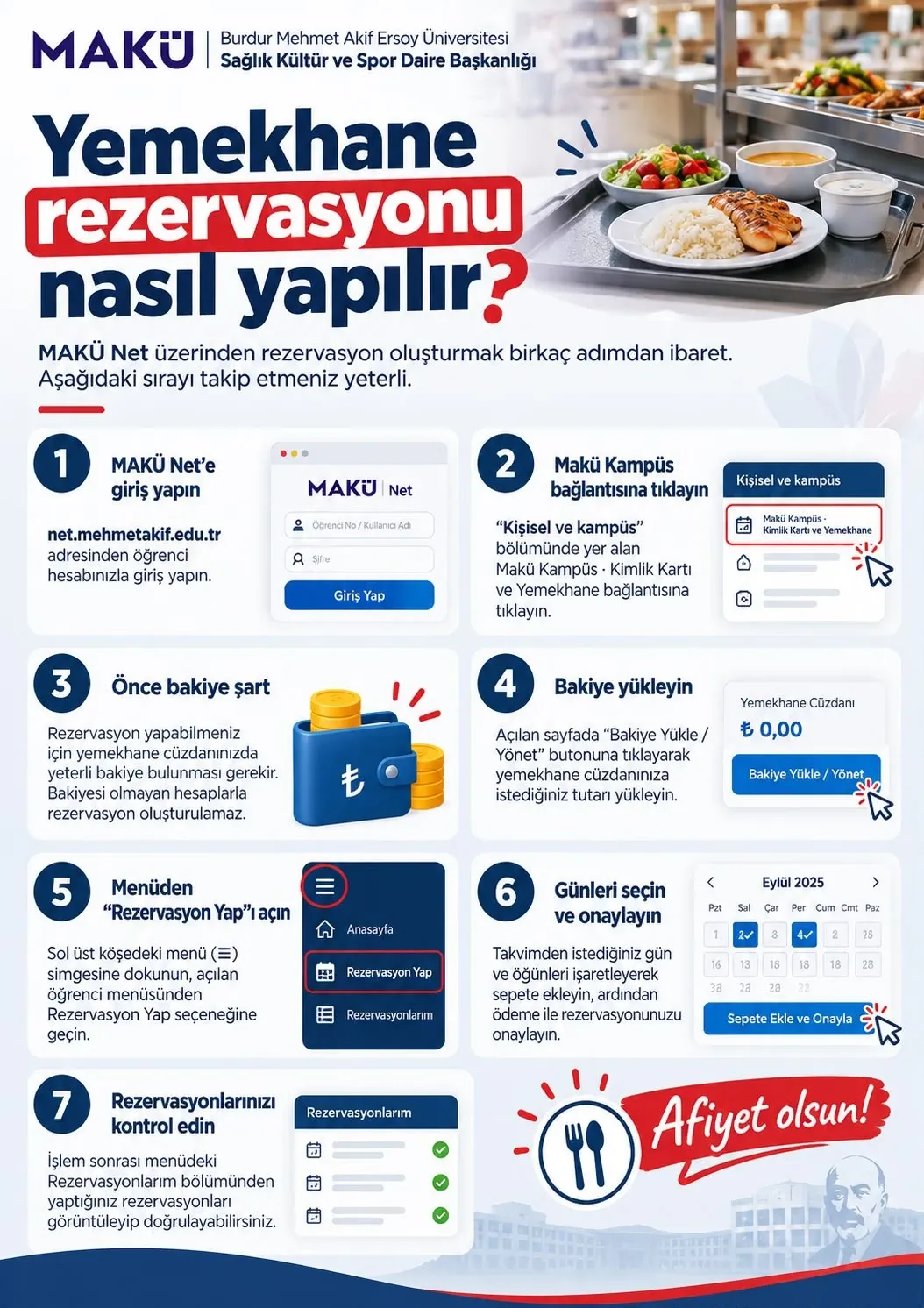
- Log in to MAKÜ Net: Sign in with your student account at net.mehmetakif.edu.tr.
- Open Makü Kampüs: In the "Personal and campus" section, click "Makü Kampüs: ID Card and Cafeteria".
- Check your balance: Your cafeteria wallet must have sufficient balance. Reservations cannot be made without balance.
- Top up your balance: Click "Top Up / Manage Balance" and load the amount you want into your cafeteria wallet.
- Open "Make a Reservation": Tap the menu (≡) icon at the top left and select "Make a Reservation" from the student menu.
- Select days and confirm: Mark the days and meals you want on the calendar, add them to the basket and confirm your reservation with payment.
- Check your reservations: You can view and verify your reservations under "My Reservations" in the menu.
Links
Source: MAKÜ Department of Health, Culture and Sports. Enjoy your meal!
Click the image to enlarge.